
Soul Browser
SoulSoft
Feb 26, 2019
40.23 MB
1.4.79
6.0
1,000,000+

Description
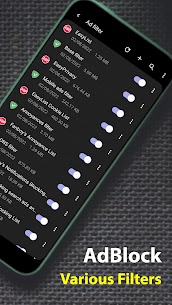
🏆 Powerful Ad Blocker
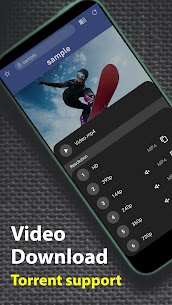
🏆 Powerful Video Download
🏆 Powerful Customization
Everything is there.
Everything is powerful.
Everything is simple.
Stylish browser with all features
A more advanced browser
Main Features
⭐ Automatic translation
⭐ Image translation
⭐ Go back without refresh
⭐ Data Saving
⭐ Clean mode
⭐ Block area
⭐ Fast download
⭐ Layout editing
⭐ Menu editing
⭐ Search bar editing
⭐ Tab bar editing
⭐ Gesture editing
⭐ One-handed mode
⭐ Dark theme
⭐ Screen filter
⭐ Reader mode
⭐ Enlarge text
⭐ Change font
⭐ Text to Speech
⭐ TV cast
⭐ Keyboard security
⭐ Lock screen
⭐ Incognito mode
⭐ Scrolling screenshot
⭐ View only images
⭐ Save all images
⭐ Download video
⭐ QR code
⭐ PDF viewer
⭐ Photo editor
⭐ DNS change function (using Android "VpnService")
And so many more features
Required Permissions
⭐ None
Optional Permissions
⭐ ACCESS_FINE_LOCATION : When requested by the site user is visiting
⭐ RECORD_AUDIO : When requested by the site user is visiting
⭐ CAMERA : Photo attachment or Barcode scanning
⭐ READ_EXTERNAL_STORAGE : File management
⭐ REQUEST_INSTALL_PACKAGES : Users can download apps from sites they visit. When a user installs a downloaded app
※ You can use the app even if you do not grant optional permissions.
What's new
⭐ Code optimized
Images


Download links
How to install Soul Browser?
1. Download the ZIP file.
2. Install the Split APKs Installer application
3. Open the application and click on "Install APKs".
4. Find the folder where the downloaded ZIP is located and select it.
5. Follow the steps that appear on the screen.


